

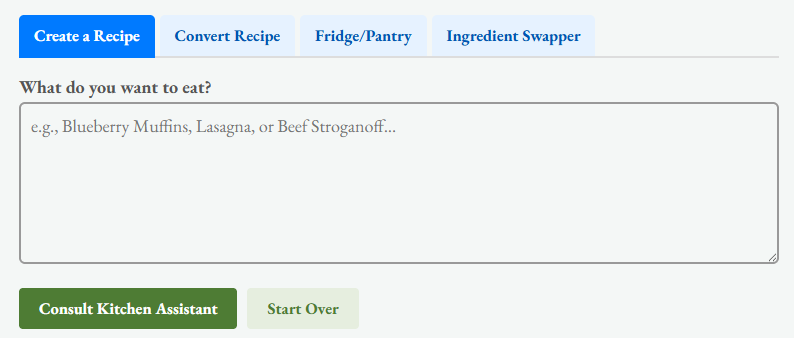
The ‘Low-Lectin Kitchen Assistant‘ is an AI-powered culinary companion designed to make the Living Low-Lectin lifestyle easier to use in the real world. Instead of stopping to research every ingredient, compare substitutions, or manually rewrite recipes, the ‘Low-Lectin Kitchen Assistant’ helps do that work for you. It can create new meals, adapt recipes you already love, work with ingredients you have on hand, and suggest practical replacements for foods you may prefer to avoid.
What makes the Low-Lectin Kitchen Assistant different?
The Low-Lectin Kitchen Assistant is different from a general-purpose recipe generator because of the knowledge behind its recommendations. Our app is built around the ingredient guidance, substitution strategies, cooking methods, and practical food choices developed for the Living Low-Lectin book and its companion resources. The substitution system is not simply asking an AI to guess what ingredient might work. It draws from structured ingredient and substitution lists created specifically for the Living Low-Lectin approach.
Those lists identify commonly used ingredients, preferred alternatives, suggested substitution ratios, preparation notes, and the reasoning behind each replacement. The AI then uses that structured guidance to adapt the rest of the recipe intelligently.
For example, replacing wheat flour with an alternative flour blend affects more than the ingredient list. The amount of liquid may need to change. Binding may need to be added. Baking time, texture, or mixing technique may also need to be adjusted.
The Kitchen Assistant takes the selected substitution and performs another recipe pass so the cooking instructions match the ingredient you actually chose. That is an important distinction. A substitution should not simply change one word in a recipe. It should change the recipe where necessary.
How the AI and LLL Ingredient Dictionary Work Together
The Low-Lectin Kitchen Assistant combines two different systems. The first is the structured Living Low-Lectin ingredient dictionary. This provides the foundation for known substitutions and preparation recommendations. The second is AI reasoning. The AI uses the information from that dictionary to understand the recipe as a whole.
This allows the assistant to consider questions such as:
- What role does this ingredient play in the recipe?
- Is it providing structure, moisture, fat, sweetness, acidity, or flavor?
- Will the replacement behave differently during cooking?
- Does the substitute require a different quantity?
- Will the cooking temperature or cooking time need to change?
- Does the ingredient require a special preparation step?
- Will another ingredient need to be adjusted to compensate?
This means the dictionary provides the rules and preferred options, while the AI helps apply those rules in context. The result is a recipe that is intended to remain recognizable, practical, and cookable rather than becoming a random collection of substitutions.
The Four Assistant Modes
The app includes four primary modes so you can approach cooking from whichever direction makes the most sense at the moment.
What do you want to eat?
This is where you start with the meal instead of the ingredients.
Just enter the name of a dish such as lasagna, blueberry muffins, chicken soup, tacos, meatloaf, or chocolate cake. The Kitchen Assistant builds a complete recipe from scratch using the Living Low-Lectin ingredient framework.
The goal is to recreate the type of meal you asked for while selecting ingredients and preparation methods that better fit the low-lectin approach. This is especially useful when you know what you are craving but do not want to search through multiple recipes looking for one that can be adapted.
Paste your recipe
Paste (or enter) your recipe directly into the Low-Lectin Kitchen Assistant.
You can use a family recipe, a recipe copied from another website, an old cookbook recipe, or something you have been making for years. The assistant identifies ingredients that may need attention, applies substitutions from the Living Low-Lectin ingredient dictionary, and reconstructs the recipe using the new ingredients.
If the original text contains a long introduction or unrelated narrative, the assistant can focus on the usable recipe itself: ingredients, quantities, preparation, and cooking instructions. The objective here is not merely to identify problem ingredients. It is to help turn the original recipe into something you can actually cook.
Fridge/Pantry
Sometimes dinner starts with the question, “What can I make with what I already have?”
Enter the ingredients currently sitting in your refrigerator, freezer, or pantry. The Kitchen Assistant evaluates the list, filters or adapts ingredients where appropriate, and builds a meal around the foods you have available. This mode is useful for reducing food waste, improvising weeknight meals, and making use of leftover ingredients without needing to search for a recipe that happens to contain exactly what is in your kitchen.
You do not need to provide a perfect ingredient list. A handful of vegetables, a protein, some herbs, and a few pantry staples may be enough for the assistant to suggest a complete meal.
Ingredient Swapper
The Ingredient Swapper is designed for quick decisions.
Enter a single ingredient and the assistant shows the preferred alternatives available in the Living Low-Lectin substitution dictionary. For many ingredients, more than one replacement may be available. That is because the best substitute often depends on what you are making.
A replacement for wheat flour in a cake may be different from the best replacement for flour used to thicken a sauce. A substitute for peanut butter in a dressing may be different from the best option in a cookie recipe.
The Ingredient Swapper gives you choices rather than assuming that one substitute works everywhere.
Interactive Smart Swaps
When the Kitchen Assistant modifies a recipe, ingredients that were replaced can be highlighted so you can see exactly what changed. Tapping the Swap indicator opens additional alternatives from the local substitution dictionary. You can then choose the replacement that best fits your preference, what you have available, or the type of dish you are preparing.
But selecting a new ingredient does more than replace the ingredient name. The app sends the updated recipe through another AI pass and rewrites the relevant preparation instructions.
For example, switching between different flours, cooking fats, dairy alternatives, vegetables, nuts, or thickeners may require changes to quantities, preparation, temperature, or cooking time.
The Kitchen Assistant attempts to make those adjustments automatically. That means you can explore alternatives without having to manually rebuild the recipe each time.
More Than Ingredient Avoidance
The Living Low-Lectin approach is also concerned with how food is prepared. For some foods, preparation can be just as important as substitution.
The Kitchen Assistant can therefore incorporate preparation strategies such as pressure cooking, peeling, deseeding, soaking, fermenting, or choosing a different variety of an ingredient when those approaches are part of the underlying ingredient guidance.
This gives the app more flexibility than a simple blacklist. Instead of automatically rejecting every ingredient that may contain lectins, the assistant can determine whether the ingredient should be replaced, prepared differently, or presented with an alternative.
That makes the tool much more useful for everyday cooking.
A Growing Companion to Living Low-Lectin
The Kitchen Assistant is intended to function as an interactive extension of the Living Low-Lectin book rather than a replacement for it. The book explains the reasoning, research, ingredient choices, preparation techniques, and broader lifestyle approach in detail. The app takes many of those concepts and turns them into something you can use while standing in the kitchen.
As the Living Low-Lectin ingredient and substitution database grows, the Kitchen Assistant can grow with it. New substitutions, preparation notes, ingredient categories, ratios, and recipe-specific guidance can be added to the underlying dictionary so the assistant becomes increasingly useful over time. Instead of keeping that information trapped inside static lists, the app allows it to become interactive.
You can ask:
- “What can I use instead?”
- “What can I make with this?”
- “How can I adapt my grandmother’s recipe?”
- “What should I change in this meal?”
And the Kitchen Assistant can use the Living Low-Lectin framework to help build an answer around the food you actually want to eat.
Your Kitchen, Your Choices
The Low-Lectin Kitchen Assistant is designed to provide options rather than make every decision for you. Individual food tolerance can vary, and people following a low-lectin lifestyle may choose different levels of restriction depending on their goals and experience.
That is why many substitutions include multiple alternatives. You remain in control of which ingredients you use. The app provides the ingredient knowledge, preparation guidance, and recipe adaptation tools to make those choices easier to apply in everyday cooking.
How to Install the App
The Low-Lectin Kitchen Assistant is a Progressive Web App, or PWA. That means you can install it directly from your browser without downloading it through a traditional app store. Once installed, it can appear on your phone or tablet alongside your other apps and launch in its own full-screen window for quick access in the kitchen.
| Device | Installation Steps |
| Android (Chrome) | Tap the automatic installation prompt when it appears, or open the Chrome menu (3 dots) and select Install app or Add to Home screen, depending on your device and browser version. |
| Apple iOS (Safari) | Tap the Share button in Safari, scroll through the available actions, and select Add to Home Screen. |
Once installed, you can open the Kitchen Assistant directly from your home screen whenever you need help creating, adapting, or troubleshooting a meal.